iGeology 3D1.03
Publisher Description
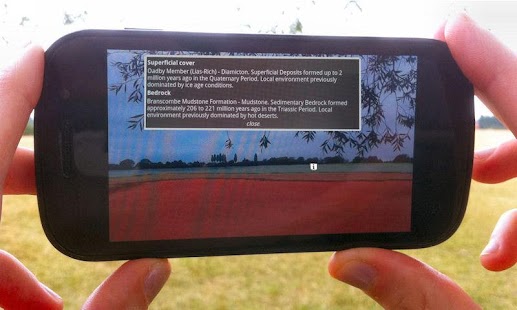
iGeology 3D shows the geology of the rocks around you as a 3D view.
Look at the landscape with your phone's camera and see the geological map painted onto the ground - geology in augmented reality.
Turn your phone in any direction to look around.
Walk around the landscape and the view will move with you.
Tap the screen on any point in the landscape to learn about the rocks you can see.
Use iGeology 3D with the iGeology geological map for a 3D view of other places.
The maps use the British Geological Survey’s 1:50,000 scale geological maps of the United Kingdom (UK).
iGeology 3D is intended for non-commercial use e.g. private study, research and educational activities. For commercial use of BGS data email: digitaldata@bgs.ac.uk
About iGeology 3D
The company that develops iGeology 3D is British Geological Survey. The latest version released by its developer is 1.03. This app was rated by 1 users of our site and has an average rating of 5.0.
To install iGeology 3D on your Android device, just click the green Continue To App button above to start the installation process. The app is listed on our website since 2012-08-17 and was downloaded 33 times. We have already checked if the download link is safe, however for your own protection we recommend that you scan the downloaded app with your antivirus. Your antivirus may detect the iGeology 3D as malware as malware if the download link to uk.ac.bgs.iGeology3D is broken.
How to install iGeology 3D on your Android device:
- Click on the Continue To App button on our website. This will redirect you to Google Play.
- Once the iGeology 3D is shown in the Google Play listing of your Android device, you can start its download and installation. Tap on the Install button located below the search bar and to the right of the app icon.
- A pop-up window with the permissions required by iGeology 3D will be shown. Click on Accept to continue the process.
- iGeology 3D will be downloaded onto your device, displaying a progress. Once the download completes, the installation will start and you'll get a notification after the installation is finished.
Program Details
System requirements
Download information
Pricing
Version History
version 1.03
posted on 2012-08-17
Several fixes and updates
version 1.03
posted on 2012-08-17
1.03: Google Play now checks device has hardware compass.,1.02: Fixed title bar half hidden on some devices.,1.02: Google Play no longer requires autofocus camera.,1.01: Fixed no geology displayed on some Android 4 devices.
